Server side template injection.
Template- placeholder value developers use when a certain object can/ should be changed by the user. SSTi arises when the template value is directly taken in from the user. ie ${GET NAME}. Attacker can manipulate the user input to send malicous code to the server. Common test for this vulnerability is when math operations are processed by the server. Eg sending a request like, {42 * 10} with on the template will give respone of 420 from the server. Different templates have different syntax so it is good to understand the application you are working with and know the templates being used. Check image below for an overview of different template syntaxes:
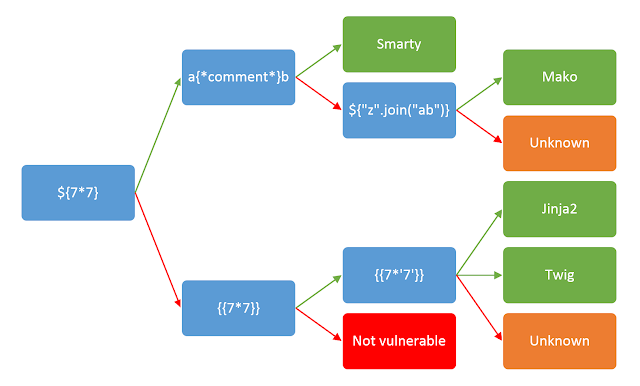
To demonstrate this vulnerabality let’s play a ctf!
THE CTF - NOTEPAD PICOCTF
This specific ctf was a flask server with a template on the error handling. Flask commonly makes use of jinja template and a library render_template Jinja template is commonly used with other frameworks like bottles. The syntax is {code}. It is built on python and creates a sandbox environment where the templates can be ran safely. To exploit Jinja, you need to break out of the sandbox and execute commands to the server. This can be done by abusing objects from a non-sandbox environment that can be accessible from the sandbox environment. Some examples of such objects or classes are: requests, config, ”, []. Think of it this way, what are some classes or objects that the server and sandbox will need to operate. They definitely need to send and receive requests between each other right? Configs are also necessary and so are the other objects that we mentioned and more. Requests have objects like environ with methods like server_shutdown that can be exploited to cause Denial of service attacks on development environments. The goal is to find methods that can be used to exploit the application functionality you are attacking. Target for this scenario, the ctf, uses templates on the error handling of the application. It uses to files on the /template/errors/ folder to render the type of error back the user. Currently two files, the bad_content.html and too_long.html exist. Files from that path are being processed by the server, our request must break out of the current path to the /templates/errors/ path for the payload to execute. This can be achieved by simply sending ../templates/errors/ before the SSTI payload. The server also processes the first 128 characters from the input and appends that to the file name, to put it together sending ..\template\errors\xxxxxxxxxxxxxxxxxxxxxxxxxxxxxxxxxxxxxxxxxxxxxxxxxxxxxxxxxxxxxxxxxxxxxxxxxxxxxxxxxxxxxxxxxxxxxxxxxxxxxxxxxxxxxxxxxxxxxxxxxxxxxxxxxxxxxxxxxxx1234 should bypass this. NOTE: we used backlinks because of a lib url_fix they use that processes backlinks as / from there documentation. The app has a filter for / and _
To break out of the jinja sandbox we can use either the config or request objects. You can also try out some know sandbox breakouts found here: https://gynvael.coldwind.pl/n/python_sandbox_escape
Config: has various methods and classes that can used. For a start {config.items()} can give a lot of information from the server including SECRET keys and even passwords in poorly configured environments. Other notable objects worth exploring are *from_objects(),root_path(),from_pyfile()*etc
Most of the objects from Config would not work in this application because of the filtering process. However, we can make use of a Method Resolution Object, the mro() and __ subclasses __ to traverse objects from the sandbox. In summary, the mro() will lead to the base class and subclasses will point down to other classes in the inherited object. You can read more about the two from here: https://www.geeksforgeeks.org/method-resolution-order-in-python-inheritance/ and here https://docs.python.org/release/2.6.4/library/stdtypes.html#class.__subclasses__
To navigate around the underscore filter, make use of arguments and parameters for example: {{request[request.args.param1][request.args.param2]}} param1=__class__¶m2=__mro__
Final payload to get the flag was:
{{request[request.args.p1][request.args.p2][11][request.args.p3]()[183]()[request.args.p4][request.args.p5][request.args.p6]('os').listdir('.')}} p1=__class__&p2=__mro__&p3=__subclasses__&p4=_module&p5=__builtins__&p6=__import__ ['templates', 'static', 'flag-c8f5526c-4122-4578-96de-d7dd27193798.txt', 'app.py']
Notice how we navigated to the base class using the mro() then moving down upto where the flag was located using __ subclasses __
This is just one example of how you can exploit SSTI vulnerabilities, in Pentests or Bug bounty sending the response you get after running the math operation {42 * 10} for example should be enough POC to prove SSTI vuln exists unless you want to escalate it to an RCE. Check out https://book.hacktricks.xyz/pentesting-web/ssti-server-side-template-injection for more tips and tricks
Happy Hacking!
Ref: https://medium.com/@nyomanpradipta120/ssti-in-flask-jinja2-20b068fdaeee